
Tap the screen. Turn the knob. Expect the cabin to feel worth the money. That’s where the Acura Technology Package steps in.
Acura built this trim as the point where the cabin starts to feel premium. Base trims leave too much out. A-Spec leans on looks. Advance adds extra comfort gear. Technology lands in the middle with leather, navigation, stronger audio, and tech you use every day.
The split shows up in how Acura applies it. MDX gets the new touchscreen and Google tech. RDX keeps the older touchpad setup. TLX uses Technology as the base trim.
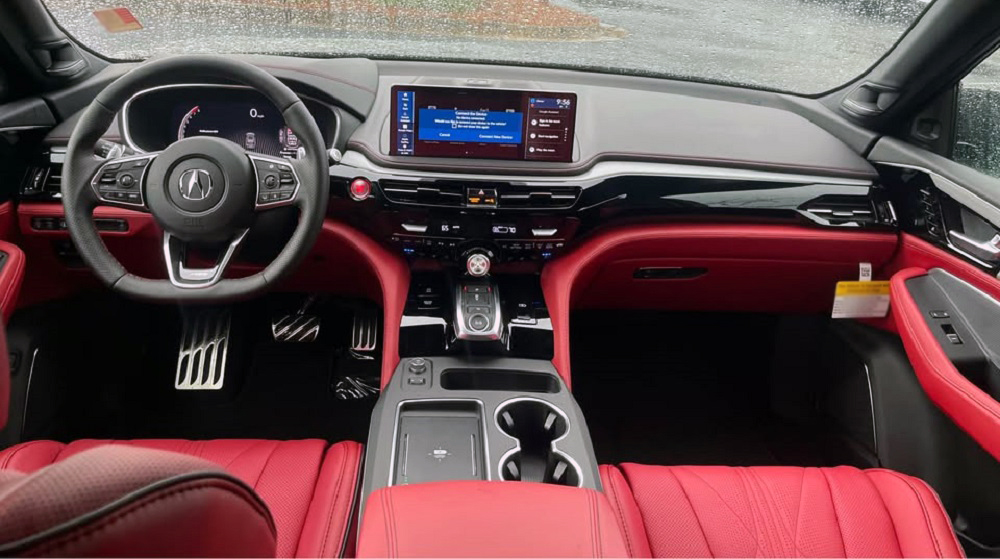
1. The real sweet spot sits right here, not at the top or bottom of the lineup
The trim where Acura finally turns everything on
Start with the base trim and the gaps show fast. Synthetic leather, weaker audio, fewer sensors, and less cabin insulation. Step into Technology and the cabin tightens up. Real Milano leather, upgraded navigation, and full driver-awareness tools come online.
This is where Acura flips the switch from “good car” to “premium experience.” The jump isn’t cosmetic. It’s hardware and system-level upgrades that affect every drive. Audio power increases, display resolution improves, and cabin materials shift from durable to refined.
Pricing usually climbs about $4,000 to $6,000 over base depending on model year and drivetrain.
Acura splits the lineup with purpose, not by accident
Technology sits between A-Spec and Advance for a reason. A-Spec adds wheels, trim, and visual aggression. Advance pushes comfort with ventilated seats, extra adjustability, and more insulation layers. Technology focuses on systems you use every mile.
That means navigation, audio, climate logic, and safety sensors take priority over styling or luxury extras. Buyers who skip Technology often circle back after noticing missing features within weeks. Most dealer inventory reflects that shift toward mid-trim demand.
Acura’s internal sales mix keeps Technology as one of the highest-volume trims across MDX and RDX.
Same name, different hardware depending on the model
MDX, RDX, and TLX don’t share a uniform package. The badge stays the same, but the hardware underneath changes. MDX Technology now carries a new interface, stronger audio hardware, and improved cabin isolation. RDX keeps older interface logic but packs strong audio and climate systems. TLX treats Technology as standard equipment rather than an upgrade.
That split changes how the package should be judged. On MDX, it’s a major upgrade. On RDX, it’s the value play. On TLX, it’s the baseline configuration.
| Model | Where Technology Package hits hardest |
|---|---|
| MDX | Interface, audio power, cabin quietness |
| RDX | Feature value, daily usability, AWD pairing |
| TLX | Base-level premium standardization |
The same package name covers three different system stacks across the lineup.
2. MDX technology package fixes the biggest weak point and turns it into a strength
Acura finally ends the touchpad and fixes the control problem
Tap inputs land where you expect now. The 2025 MDX drops the True Touchpad and moves to a 12.3-inch touchscreen. Menus respond faster, and swipe logic matches a phone, not a laptop trackpad.
Voice control changes too. Google built-in runs navigation, calls, and climate commands without lag. Commands process in seconds, not multiple menu steps like older MDX systems.
The display pairs with a 12.3-inch digital cluster that pushes navigation and safety data into the driver’s line of sight.
Audio moves from background feature to primary hardware upgrade
Start the engine and the cabin stays quieter than older MDX models. Acura added thicker glass, better fender liners, and more insulation layers. That gives the audio system a cleaner base to work from.
The Technology Package now runs a 19-speaker Bang & Olufsen system. Output hits 1,475 watts across 16 channels. Tweeters use Acoustic Lens hardware to spread high frequencies across the cabin instead of firing straight ahead.
Sound tuning shifts through Beosonic modes that change tone balance instead of simple bass sliders.
The powertrain stays simple and avoids the usual turbo headaches
Under the hood sits a 3.5L naturally aspirated V6. Output lands at 290 hp and 267 lb-ft. No turbo heat soak, no boost spikes, no intercooler lag.
The 10-speed automatic spreads ratios wide. Lower gears launch harder, upper gears drop highway rpm. Gear changes stay smooth under light throttle and firm under load.
SH-AWD remains optional and changes how the MDX moves through corners.
SH-AWD adds real torque control, not just traction
Power doesn’t just split front to rear. The system can send up to 70% of torque to the rear axle. From there, it can route 100% of that rear torque to a single wheel.
That torque vectoring creates a yaw push through corners. The front end pulls less, and understeer drops. You feel it most on tight ramps and wet pavement.
Towing climbs to 5,000 lbs with SH-AWD, compared to 3,500 lbs in FWD.
3. RDX technology package nails daily value but carries the old control system
The touchpad still runs the show, and it splits owners fast
Slide a finger across the pad and the cursor jumps to fixed points on screen. Acura calls it absolute positioning. Each spot on the pad maps to a spot on the display.
New drivers overshoot menus and stab at the pad. Muscle memory fixes it after a few weeks. The system keeps your hand near the console instead of reaching forward.
The display stays at 10.2 inches with wide-screen CarPlay and Android Auto support.
The hardware underneath stays strong and responsive
The 2.0L turbo hits peak torque early. Output lands at 272 hp and 280 lb-ft. Torque arrives around 1,600 rpm and holds through mid-range pull.
The 10-speed automatic keeps the engine in boost during city driving. Downshifts come quick when you tip in throttle. SH-AWD comes standard on most trims and keeps traction stable under load.
Heat management stays typical for a small turbo, with intake temps climbing in stop-and-go traffic.
The package bundles the features drivers actually notice
Step inside and the jump from base trim shows fast. Milano leather replaces synthetic surfaces. Cabin trim tightens, and seat support improves on long drives.
Audio runs through a 12-speaker ELS Studio system. Output hits 550 watts with a 12-channel amp. Sound stays clean at high volume with low distortion.
GPS-linked climate adjusts airflow based on sun position and vehicle heading.
The platform sits at the edge of a major change
Current RDX runs the same turbo layout introduced in this generation. Acura already confirmed the next model moves to a hybrid system.
That shift will change how torque is delivered and how the cabin electronics are structured. The current Technology Package reflects a mature setup, not a new direction.
Production for the current generation is expected to phase out ahead of the hybrid launch cycle.
4. TLX technology package sets the baseline, not the upgrade
Acura shifts the starting point up, and it changes how the trim works
Walk into a TLX lineup and Technology sits at the bottom. There is no stripped base model below it for 2025. That changes how buyers should read the package.
Every TLX now starts with a full premium interior stack. Leather, navigation, and upgraded audio come standard. Pricing lands around $45,400 for the 2.0T FWD configuration.
This turns Technology from an option into the default hardware level.
The chassis still does the heavy lifting under the tech
Press into a corner and the front end stays planted. TLX uses a double-wishbone front suspension instead of a strut setup. That keeps camber control tighter under load and improves steering feel.
The 2.0L turbo pushes 272 hp and 280 lb-ft through a 10-speed automatic. Power comes in early and stays flat through mid-range. SH-AWD remains available for better grip under throttle.
Front-end geometry gives TLX sharper turn-in than most front-drive-based sedans.
The cabin runs a dual-screen system that favors structure over speed
Look at the center stack and two displays handle different tasks. The upper screen shows navigation and system data. The lower interface manages inputs through the touchpad.
Screen size reaches 12.3 inches for the main display. Menus stay organized but require more steps than a direct touchscreen. Drivers often rely on steering-wheel shortcuts to cut through menus.
The system still lacks a full touchscreen interface found in the newer MDX.
Audio and materials carry the premium feel inside the cabin
Sound runs through a 13-speaker ELS Studio system. Output sits at 550 watts with added overhead speakers for better staging.
Seats use perforated Milano leather with 12-way power adjustment. Cabin trim includes contrast stitching and tighter panel fit than older TLX models. Road noise stays controlled but not as quiet as MDX.
Ventilated seats and 16-way adjustability remain locked behind Advance trim.
5. Acura splits its tech direction, touchscreen on MDX, touchpad holds on RDX and TLX
MDX moves to a phone-like system that cuts input time
Tap the screen and inputs land directly. No cursor drift, no mapping delay. The 12.3-inch touchscreen responds like a tablet with faster menu access.
Google built-in handles navigation, voice search, and apps at the system level. Maps load with live traffic and route updates in real time. Voice commands adjust climate, media, and calls without digging through menus.
System latency drops compared to older Acura interfaces, with fewer multi-step inputs per command.
RDX and TLX keep the touchpad and demand driver adaptation
Hand stays on the console instead of reaching forward. The touchpad maps finger position to screen position with fixed coordinates.
Menu navigation depends on muscle memory. Miss the target and the cursor jumps to the wrong tile. Drivers often overshoot icons until they build repeatable input patterns.
The system reduces reach but increases learning time for new users.
Acura runs two interface systems at once, and it shows in daily use
Switch between MDX and RDX and the difference hits immediately. One system uses direct touch and voice. The other uses indirect input through a pad.
This split affects how fast drivers complete tasks. Navigation entry, media selection, and climate changes take fewer steps on MDX. RDX and TLX require more inputs for the same action.
RDX and TLX still rely on proprietary AcuraLink software rather than a full Google-based system.
6. Driver assist hardware gets stronger, calibration still defines real safety
AcuraWatch loads radar, cameras, and lane logic into every Technology trim
Radar sits behind the grille and tracks closing speed ahead. A forward camera reads lane markings and object shapes at highway speeds. Both systems feed the ECU for braking and steering inputs.
Adaptive cruise holds distance using throttle and brake control. Lane keeping applies small steering torque corrections instead of sharp inputs. Collision mitigation braking triggers when closing speed crosses a set threshold.
Brake intervention starts before full driver input in certain closing scenarios, typically above 19 mph.
Lane centering works best on highways, fades on worn road surfaces
Clear lane lines keep the system stable. Steering stays centered with small corrections at steady speeds. The system reduces input when markings fade or split.
Urban roads expose its limits fast. Tight curves, poor paint, and intersections confuse the camera. Steering assist drops out without warning in low-contrast conditions.
Lane centering requires visible markings and consistent edge detection to stay active.
False alerts and abrupt braking still show up in dense traffic
Forward collision warnings trigger early in some stop-and-go conditions. Radar picks up vehicles in adjacent lanes during merges. The system may apply light braking when objects move across the detection field.
Drivers report sudden deceleration when vehicles cut in at low angles. Software updates reduce frequency but do not eliminate it. Sensitivity settings help but cannot fully filter edge cases.
Unexpected braking events still occur during multi-lane merges and urban congestion.
Sensor alignment and repair costs add hidden ownership impact
Front radar requires precise calibration after bumper or grille work. Camera alignment needs a flat surface and target boards during service. Shops use scan tools and calibration rigs to reset system parameters.
A minor front-end repair can trigger a full recalibration process. Labor runs 1.5 to 3.0 hours depending on equipment. Total calibration cost typically lands between $250 and $600.
Radar misalignment can trigger DTCs like C1A10 and disable adaptive cruise control.
7. The price gap hides in trim jumps, not the package itself
Technology trim locks core features, upgrades require full trim jumps
Buyers don’t add Technology as a small option anymore. It comes baked into mid-level trims like RDX Technology or TLX base. Moving higher means stepping into A-Spec or Advance with bundled features.
That jump carries a real cost. The gap from Technology to Advance often runs $4,000 to $6,000 depending on model. Features like ventilated seats and surround-view cameras sit behind that paywall.
You pay for grouped hardware, not individual features.
Feature stacking creates overlap across trims
Some features repeat across trims with minor changes. Audio systems scale from 12 to 16 speakers depending on model. Seat adjustments increase, but core layout stays the same.
Navigation, wireless charging, and AcuraLink stay standard once you hit Technology. Higher trims layer comfort and visual upgrades on top. The functional difference narrows compared to the price increase.
Trim stacking drives cost more than raw feature count.
Real ownership costs include tech repair and replacement risk
Infotainment screens cost more than traditional radios. A failed display unit can run $1,200 to $2,500 depending on model. Labor adds another $200 to $400 for removal and programming.
Touchpads and control modules also fail over time. Input lag or dead zones often require full module replacement, not repair. Warranty covers early failures, but long-term ownership shifts cost to the owner.
A full infotainment replacement can exceed $2,800 out of warranty.
Subscription features stay limited but still present
Acura avoids heavy subscription lockouts compared to some alternatives. Remote services and app features still require AcuraLink subscriptions after trial periods. Pricing typically ranges from $89 to $260 per year.
Core driving and safety systems remain fully functional without subscription. Navigation and voice services depend on data access for full performance. Expired services reduce feature depth but do not disable core hardware.
Remote start and vehicle tracking can stop working once the subscription lapses.
8. Reliability patterns show up in electronics, not engines or drivetrains
Infotainment lag and freezes originate from software load, not hardware limits
Cold starts expose the system most. Boot time stretches past 20 seconds on some units. Inputs lag while background processes load navigation and media services.
Owners report frozen screens during Bluetooth pairing or map loading. Hard resets through the power button restore function in many cases. Persistent issues often require software updates at the dealer.
Firmware updates fix stability problems but require dealer-level access in most cases.
Touchpad wear creates input errors over time
The touchpad surface loses sensitivity with repeated use. Dead zones appear where finger tracking drops out. Cursor jumps or fails to register precise inputs.
Replacement involves the full touchpad module, not just the surface. Parts pricing runs $300 to $700 depending on model. Labor adds about 1.0 to 1.5 hours for console removal.
Touchpad failure does not trigger a DTC and requires manual diagnosis.
Camera and sensor faults show up through specific DTC patterns
Front camera systems throw faults when calibration drifts. Codes like B2A60 or B2A63 point to camera misalignment or obstruction. Radar faults may log C1A10 when signal return weakens.
Weather plays a role in sensor reliability. Heavy rain, snow, or dirt blocks camera view and radar reflection. Systems disable temporarily until visibility returns.
Sensor faults often clear after cleaning, but stored codes remain until reset.
| System | Common DTC | Failure Trigger | Result |
|---|---|---|---|
| Front camera | B2A60 / B2A63 | Misalignment, blocked lens | Lane assist disabled |
| Radar sensor | C1A10 | Signal loss, alignment shift | Adaptive cruise disabled |
| Parking sensors | B10A2 | Dirt, water intrusion | False proximity alerts |
Long-term durability stays strong outside electronics
Engines and transmissions hold up under normal service intervals. The 2.0T and V6 platforms show low failure rates with regular oil changes. Transmission issues remain rare compared to older Acura generations.
Electrical faults drive most owner complaints past 50,000 miles. Mechanical systems rarely trigger major repair costs in early ownership. The balance shifts toward electronics as vehicles age.
Major powertrain repairs remain uncommon under 100,000 miles, while infotainment issues can appear as early as 30,000 miles.
Sources & References
- Acura A-Spec vs Technology vs Advance: Which Trim Fits Your Style and Budget?
- 2025 Acura MDX Trim Levels & Configurations Explained – Elk Grove Acura
- 2025 Acura MDX Specifications & Features
- Compare 2025 MDX Technology Package vs Advance Package – Peoria, AZ
- Acura SUV Models | Compare Benefits
- Configurations For 2025 Acura TLX Trim Levels Explained
- 2025 Acura TLX Trim Levels & Configurations Explained – Elk Grove Acura
- Acura Technology Package
- Comparing the 2025 and 2026 Acura RDX
- Next-Generation Acura RDX Will Go Hybrid
- Bolder, Quieter 2025 Acura MDX Now on Sale with Bang & Olufsen Audio, New Touchscreen and Safety Advances – Honda Newsroom
- Bolder, Quieter 2025 Acura MDX Now on Sale with Bang & Olufsen Audio, New Touchscreen and Safety Advances
- The Best Gets Better: 2025 Acura MDX Receives Bolder Styling, Enhanced Tech and Bang & Olufsen Audio
- 2025 Acura MDX: 31-Speaker Audio System, No Trackpad – Kelley Blue Book
- Bang & Olufsen Premium Audio System with 19 Speakers – Acura Info Center
- ELS STUDIO® 13-Speaker Premium Audio System – Acura Info Center
- Discover the ELS STUDIO® Premium Audio Experience – Speedcraft Acura
- 2025 Acura RDX Trim Levels | AutoNation Acura Spokane Valley
- Acura ELS Studio 3D™ Named Car Audio System of the Year by Business Insider
- Acura ELS Studio 3D™ Named Car Audio System of the Year by Business Insider
- Acura/ELS Studio® 3D Premium Audio System with 16 Speakers
- 2025 Acura MDX Finally Ditches Finicky Touchpad for New Touchscreen – Car and Driver
- Does Google built-in Come Standard on the 2026 Acura MDX for Springfield, OH Shoppers?
- 2026 Vs. 2025 Acura MDX: Model Year Comparison
- Does Google built-in in the 2025 Acura ADX make everyday driving easier in Norristown, PA? – Montgomeryville Acura
- Google built in – worth it to get 2025 mdx? : r/Acura – Reddit
- 2025 Acura MDX Technology Package
- Three Must-Have Technology Features in the 2025 Acura RDX – Acura of Pleasanton
- A Closer Look at the 2025 Acura TLX Tech Features
- What Technology Comes Standard in the 2025 Acura TLX?
- The entire world is celebrating the demise of the TTI pad in the 2025 MDX… : r/Acura – Reddit
- Acura – Current Lineup, Reviews, Prices & Recommendations – Supercars.net
- Refreshed 2025 Acura RDX Gains Sophisticated New Styling, Cabin Updates and Enhanced Technology
- What is the Acura Technology Package?
- Acura Navigation System with 3D View and Voice Recognition
- The Acura MDX: What’s the Difference Between Packages?
- What is Acura GPS-Linked Climate Control?
- Automatic Climate Control System – Acura Info Center
- What is the Acura Technology Package?
- 4 Ways To Beat the Heat in Your Acura This Summer – Hall Acura Virginia Beach
- GPS Linked Climate Control – Tech Tuesdays – YouTube
- Automatic Climate Control System – Acura Info Center
- Automatic Climate Control System – Acura Info Center
- 2025 Acura ADX Features: Engine, Safety, Audio, & More
- Did you know the Acura RDX &MDX have rear camera washers to keep salt and snow out of your view!! ❄️ – YouTube
- How to Wash the Rear Camera in your new Acura – YouTube
- 2024 ACURA RDX REAR CAMERA WASHER – YouTube
- 2025 Acura RDX Interior: Luxury And Comfort Unveiled
- 2026 Acura MDX Trim Levels with Prices, Photos, & Specs
- 16-Way Power Front Seats – Acura Info Center
- 2020 Acura RDX Interior Features | Sterling Acura of Austin
- 2025 Acura RDX | Premium Sport Crossover SUV
- Big Acura RDX Changes: Production Ends Before New Hybrid Release
- Research Acura Models: Specs, Technology & Safety | Fisher Acura
- Acura TLX Is Being Discontinued – CarsDirect