
Tap Start. See the phone connect. Hear silence anyway. That’s where many Subaru Bluetooth pairing problems begin. Subaru used several infotainment systems across the last 15 years. That matters fast.
A 2012 Forester, a 2019 Crosstrek, and a 2024 Outback can all fail in different ways. Older units usually choke on pairing method and old Bluetooth profiles. Newer Starlink units lean toward software bugs, device-memory glitches, and dead audio paths.
Subaru’s own bulletins show this goes deeper than a bad phone sync. Some systems lose Bluetooth audio, refuse device registration, or qualify for extended head-unit coverage. So the fix starts with the hardware generation, not random resets.
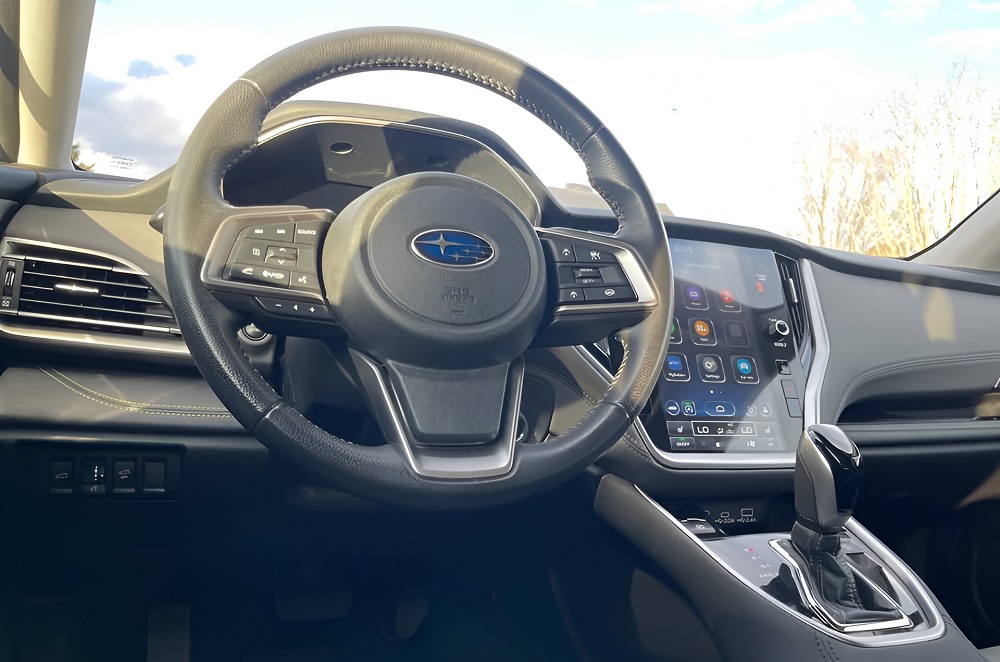
1. The first fix starts with the screen in the dash
Subaru used different head units, and they fail in different ways
Subaru did not use one Bluetooth system for all years. It used Clarion and Fujitsu Ten first. Then came Harman. Then Denso CP1 and CP1.5. Each one has its own software, memory limits, and pairing behavior.
That changes what fails. Older units often pair once, then forget the phone. Harman units can show ghost connections and random dropouts. Denso units can gray out the Bluetooth menu or lose audio even when the phone still shows connected.
Trim level matters because base radios and big screens don’t get fixed the same way
Base systems are simpler. Many need dealer USB updates. They do not all support over-the-air updates.
The larger Starlink screens do more work. They handle Bluetooth, phone sync, and wireless phone features on the same unit. When that software stumbles, the Bluetooth fault can drag down audio, menus, and call functions at the same time.
| Era | Main supplier | Typical years | Common Bluetooth trouble |
|---|---|---|---|
| Early systems | Clarion / Fujitsu Ten | 2011–2014 | Pairing quirks, weak phone support |
| Starlink Gen 2 | Fujitsu Ten / Denso Ten | 2015–2017 | Full device list, bad reconnects |
| Harman Gen 3.0 / 3.1 | Harman | 2017–2021 | Ghost connections, reboot trouble |
| Denso CP1 | Denso | 2020–2022 | Gray menus, audio routing bugs |
| Denso CP1.5 | Denso | 2023–2025 | Bluetooth and Wi-Fi conflicts |
Model year alone can point you to the wrong fix
Two Subarus from nearby years can need different repairs. One may need the old voice-command pairing path. Another may need a dealer software update through dealership mode.
That’s why the first question is not iPhone or Android. It’s which head unit is in the car. On newer Denso systems, Subaru’s update procedure alone can take about 15 to 20 minutes after the correct files are loaded.
2. Old Subaru systems fail on the pairing path before they fail on the radio
The steering-wheel route writes deeper than the screen menu
Many 2010–2014 Subaru units have a weird habit. Pair through the screen menu, and the phone may connect only for that trip. Shut the car off, restart it, and the link is gone.
The steering-wheel voice route often works better on those cars. It sends the pairing command through the hands-free module, not just the audio screen path. That route can store the phone in persistent memory instead of temporary memory. Owners on older Forester and Outback systems keep finding the same pattern.
This is why some older cars look random. The radio may work fine. The phone may even show paired. The car still fails to reconnect on the next key cycle because the write did not stick in the right module.
New phones can outrun old Subaru Bluetooth hardware
Older Clarion hardware used earlier Bluetooth profile support. The report ties many early units to AVRCP 1.3 and HFP 1.5. Newer phones now speak richer versions and pass more metadata during setup and playback.
That mismatch shows up in familiar ways. The phone pairs, but track info never loads. The screen hangs on media loading. Calls may connect, but audio control and song data can break.
The fault can hide for weeks. A phone software update often tips it over. The Subaru still holds the old pairing record, but the new handshake no longer fits that aging Bluetooth stack.
Old memory limits make multi-driver cars fail faster
These older units do not hold many devices. The report says most Subaru head units cap out around 5 to 7 paired phones. Once that memory fills, odd behavior starts.
Some cars stop creating a PIN. Some forget the oldest phone. Some show connected while sending no sound or call data at all. That happens when the saved MAC-address registry gets dirty or corrupted.
That limit matters in family cars. A Forester shared by 2 drivers, plus old phones still saved in memory, can hit the ceiling fast. Past that point, clearing the full device list is often the only way to restore clean pairing. The hard limit is usually 5 to 7 stored devices.
3. Modern Starlink units fail when the software memory goes dirty
Full device memory can make the radio lie about what it sees
Modern Subaru units still have a hard limit on saved devices. The report says most head units hold about 5 to 7 phones. Once that list gets crowded, the system can stop adding new devices or lose track of old ones.
This is where the lies start. The phone may show connected. The Subaru screen may still show the device name. Audio never moves, calls fail, or the head unit says no device is connected.
That happens when the pairing registry gets corrupted. The saved MAC-address record stays in memory, but the car cannot pass live data through the audio layer. The fix often starts with deleting every stored device, not just the problem phone.
Denso and Harman units often crash in the Bluetooth layer first
Modern Subaru failures often show up as dead menus. The Bluetooth or Manage Devices button can turn gray and stop responding. That points to a software crash inside the head unit, not a weak phone signal.
Some cars lose the microphone path during calls. Others stream audio but refuse to register or delete devices. Subaru’s bulletin trail for newer Denso systems lists those exact faults, including Bluetooth audio failure and trouble unregistering paired devices.
The bigger screen makes the mess worse. On Denso systems, Bluetooth, audio routing, phone sync, and parts of the main touchscreen all live in the same control unit. When one software layer stalls, the fault can spill into the rest of the screen.
Subaru now treats software updates as the first real repair
Subaru’s updated 15-305-22R bulletin is direct about it. The bulletin lists Bluetooth faults among the symptoms fixed by software, including failure to play Bluetooth audio and failure to register or remove paired devices.
That matters because the factory fix is no longer guesswork. Dealers are told to check the software level and install the right package before replacing hardware. On many newer Denso systems, the update itself takes about 15 to 20 minutes once the correct files are loaded.
A bad update path can waste a full visit. Subaru’s own bulletin warns that mismatched software files can trigger a failed load message, and the car must be updated with the correct package for that exact unit.
4. The 3G shutdown created a second failure path under the dash
The DCM can stop Bluetooth calling while Bluetooth still looks alive
The Data Communication Module, or DCM, does more than telematics. It also sits in the path for call audio and microphone functions on affected Subaru models. When that module goes bad, the phone may still pair, but call sound or voice input can vanish.
That creates a fake Bluetooth story. Audio may still stream. The phone icon may still show connected. The real fault sits in the DCM side of the circuit, not in the phone pairing menu.
The 3G sunset pushed older DCMs into a battery-drain loop
Many 2015–2020 Subaru vehicles used DCM hardware built for the old AT&T 3G network. After that network shut down, many modules kept hunting for service and never went to sleep. Subaru later tied this to excessive dark current draw and issued warranty extensions and repair paths around it.
That loop can flatten a battery in a few days. The technical report says a healthy parked vehicle should draw no more than about 50 mA after modules go to sleep. A stuck DCM can draw far more and drain a lead-acid battery in 48 to 72 hours.
Pulling the fuse can stop the drain and stop the microphone
Many owners tried the fast fix first. They pulled the DCM fuse to stop the battery draw. That can work for the drain, but it can also break the speaker and microphone path used for Bluetooth calls and voice input.
That is why some cars come back with a new complaint. The dead battery is gone, but call audio is gone too. The report points to the 7.5A fuse in slot #9 as one of the common fuse pulls tied to this chain.
Subaru’s bypass box is a real hardware repair, not a garage hack
Subaru later released a DCM Bypass Box under bulletin 15-318-24R. The part is meant for vehicles without an active STARLINK subscription when diagnosis points to DCM failure. Subaru says the bypass box can replace the DCM to support infotainment audio input and output functions.
The bulletin lists bypass-box part number 86229AL400. Subaru also says this route is only for vehicles with no active subscription. If the car still has active STARLINK service, the repair path calls for a DCM, not the bypass box.
Warranty coverage now depends on year, mileage, and subscription status
Subaru’s DCM warranty extension moved coverage to 8 years or 100,000 miles for certain affected vehicles. The notice also gave all affected vehicles a 1-year coverage window from the customer-notification date, no matter the mileage or warranty start date. Reimbursement is available for some prior out-of-pocket DCM repairs.
There is a hard split in repair choice. For some 2016–2018 vehicles without subscription service, Subaru’s own FAQ says the recommended procedure is reprogramming the DCM to Factory Mode, not a bypass box. The bypass box is not recommended there.
5. Phone updates can break the handshake from the other side
iPhones often fail after an update or phone swap
Many iPhone complaints start the same way. The phone pairs once. It may work that day. The next key cycle stops auto-reconnect.
The report ties that to stale network data inside iOS. When an iPhone migrates data from an old device, it can carry over old Bluetooth keys. The Subaru head unit then rejects the next handshake as a mismatch.
That is why deleting the phone alone often fails. The old pairing data still sits in the iPhone network cache. On the phone side, the real reset is Reset Network Settings, not another tap on Forget Device.
Android can choke older Subaru units with newer Bluetooth settings
Android gives the user more control, and that can save an older Subaru. The report flags AVRCP 1.3 or 1.4 as a common fix for metadata bugs on older Harman and Clarion units. It also points to AAC or SBC and disabling HD audio when stutter or lag starts.
The failure usually shows up in audio first. Track info disappears. Audio lags behind button presses. The car connects, but the cabin acts like the phone speaks the wrong language.
Older Subaru units were built around earlier Bluetooth behavior. A newer Android phone can throw more data, richer metadata, or higher-bitrate audio than the head unit handles cleanly. The report ties 2017–2019 Crosstrek and Forester metadata trouble to this kind of AVRCP mismatch.
Wireless phone features can make Bluetooth look guilty
Newer Subaru systems juggle Bluetooth and Wi-Fi at the same time. Wireless Android Auto and wireless CarPlay both use Bluetooth for setup, then hand off part of the load to Wi-Fi. A failure in that handoff can look like bad Bluetooth even when the real fight sits in the wireless stack.
Subaru’s own setup guides show how picky that process is. The phone must match the car PIN, allow contacts, and stay current on software. On USB-first setup paths, Subaru also calls for a good cable and the correct front data port, not a charge-only port.
That matters on cars with random cutouts. A Bluetooth-only test can tell you more than a full wireless phone stack. If Bluetooth audio works with Wi-Fi off, the pairing layer may be fine and the problem may sit in the wireless bridge.
6. The right reset order matters more than the reset itself
Start with the resets that clear dirty memory
A frozen Bluetooth stack often wakes back up with a clean reboot cycle. Subaru owners can soft-reboot many head units by holding the volume knob for about 30 seconds until the screen goes black and restarts. A phone reboot clears the phone-side Bluetooth process at the same time.
Then clear the saved pairings from both sides. Delete every phone from the Subaru. Delete the Subaru from the phone. Half-clean resets leave stale records behind and bring the same fault back on the next handshake.
Phone names matter more than they should. The report notes that emojis and special characters can crash or confuse the Subaru device-list renderer. A plain device name gives the head unit less to trip over.
The next stop is software status, not random parts swapping
Once simple resets fail, the software level becomes the next hard check. Subaru’s current head-unit warranty and update bulletins tell dealers to verify software first and apply the latest update before they replace hardware. That puts firmware in the middle of diagnosis, not at the end.
That matters because many Bluetooth complaints are listed as software symptoms. Subaru’s bulletin trail names device registration failure, Bluetooth audio failure, gray menus, and broader infotainment faults in the same repair path. A head unit with old firmware can waste hours of diagnosis and still need the update later.
Dealership mode sits one layer above the normal owner menu
Subaru head units hide a deeper service menu. The technical report says many 2015–2019 units enter dealership mode by holding Home while pressing the Audio/Tune knob 5 times. That menu lets a technician check version data and reach deeper update functions.
Newer systems changed the access path. Subaru’s later Denso update bulletin calls for different button inputs, and some 2024–2025 applications require SSM5-R to reach the software update setting. That means the update path changed with the hardware, not just the screen style.
A capacitive discharge is the last hard reset before replacement
Some head units stop responding to touch and buttons. The report lists a capacitive discharge as a last-resort reset before unit replacement. That process drains the stored charge in the control unit so it can cold-boot cleanly.
This is not a casual first move. It belongs after soft reboot, full device-list cleanup, and software checks. If the head unit still will not hold a Bluetooth connection after that chain, the next step is often warranty diagnosis or replacement, not another phone reset.
7. Warranty coverage changes the repair math fast
Subaru now covers some Bluetooth failures as head-unit defects
Subaru issued bulletin 15-322-25 for certain CP1 and Gen 3.1 head units. It extends coverage to 8 years or 150,000 miles for qualifying infotainment failures. The covered symptom list includes Bluetooth failure, black or blank screens, loss of audio, repeated rebooting, and failed phone integration features.
That matters when a car will not add a phone or hold audio after resets and updates. A dead Bluetooth layer may be part of a larger head-unit failure that Subaru already knows about. At that point, the repair path can shift from paid diagnosis to warranty-backed replacement.
| Affected vehicles | Hardware group | Coverage | Qualifying symptoms tied to this article |
|---|---|---|---|
| 2019–2023 Forester, Impreza, Crosstrek | Gen 3.1 | 8 years / 150,000 miles | Bluetooth failure, black screen, loss of audio |
| 2020–2022 Outback, Legacy | CP1 | 8 years / 150,000 miles | Rebooting, inoperative touch screen, audio faults |
| 2019–2022 Ascent | Gen 3.1 | 8 years / 150,000 miles | CarPlay/Android Auto failure, broader head-unit faults |
DCM coverage can fix the “paired but no call audio” problem
Subaru also issued a DCM warranty extension. That coverage runs to 8 years or 100,000 miles on affected vehicles, with a separate 1-year broad coverage window from customer notification for all affected vehicles. It can cover DCM update work, battery recharge or replacement when the DCM caused the drain, and related repair paths.
This is where the diagnosis splits. A Bluetooth menu failure can point to the head unit. A paired phone with dead call audio, dead mic input, or battery-drain history can point to the DCM side instead. Those two failures live under different warranty buckets and use different repair parts.
Subscription status decides whether Subaru installs a DCM or a bypass box
Subaru’s DCM bypass-box bulletin is strict on this point. Vehicles with no active STARLINK subscription can use the bypass box if DCM diagnosis calls for replacement. Vehicles with an active subscription must get a DCM, not the bypass box.
That creates a hard cutoff. An unsubscribed car may keep Bluetooth call audio through the bypass-box repair path. A subscribed car needs the telematics hardware restored to keep service active. The bypass-box bulletin lists part 86229AL400 and limits its use by subscription status.
Sources & References
- static.nhtsa.gov
- subaru.com
- static.nhtsa.gov
- static.nhtsa.gov
- static.nhtsa.gov
- subaru.com
- SERVICE BULLETIN – nhtsa
- Subaru Bluetooth Pairing Explained by Subaru Stamford Dealer
- If you have bluetooth issues with your car on Android O – Reddit
- Have any of you fixed the dreaded Bluetooth connection issues? : r/SubaruForester – Reddit
- iPhone 16 Pro Max not auto-connecting to car Bluetooth – Apple Support Communities
- SERVICE BULLETIN – nhtsa