
Watch the check-engine light glow on the dash. Question hits fast, what failed this time?
Plug a scanner into the OBD port and most cheap readers spit out one code. Maybe P0420, maybe P0171. That number alone rarely tells the real story. A modern car runs dozens of control modules, and basic readers only talk to the engine computer.
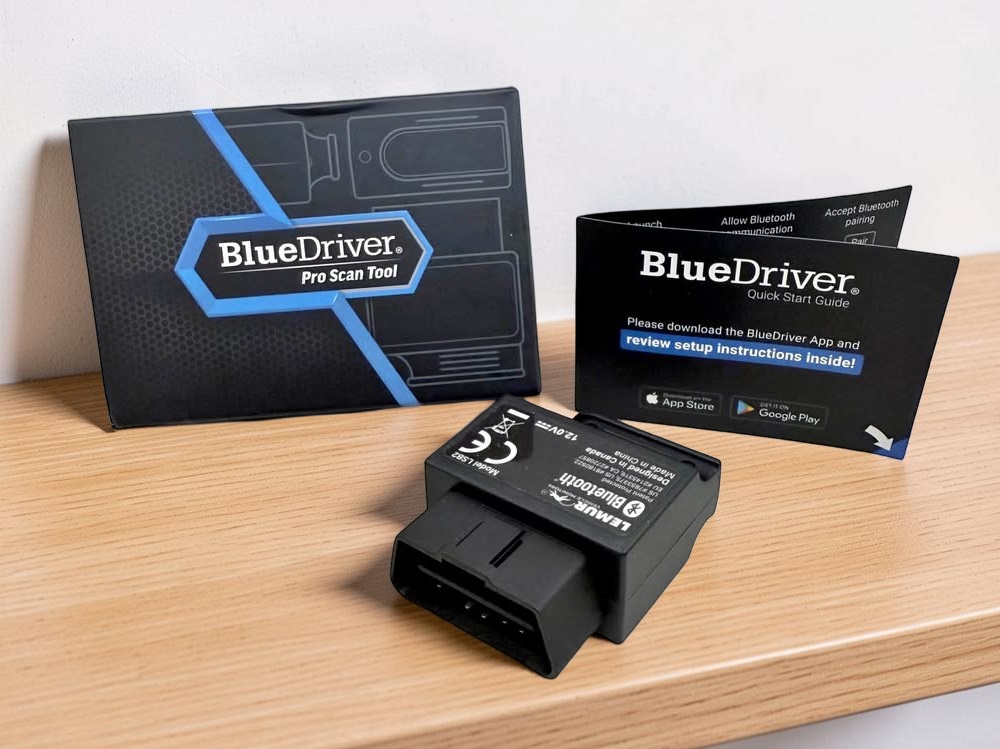
BlueDriver steps in as a mid-tier diagnostic tool built around a Bluetooth dongle and a phone app. The hardware plugs into the OBD port. The app handles decoding, live data, and repair guidance pulled from a large database of verified fixes.
This guide tears through the whole system. Hardware design, app usability, enhanced module coverage, Repair Reports, live-data limits, and real battery-draw behavior all get tested. The goal is simple, find out whether BlueDriver actually earns space in your glovebox.
1. Where BlueDriver sits in the scan-tool food chain
The middle ground between cheap readers and shop tablets
Plug a $20 code reader into the OBD port and it talks to one computer, the engine ECU. That covers emissions faults and little else. ABS, airbags, and transmission modules stay silent.
BlueDriver targets the space between those bargain readers and professional scan tablets. The dongle handles protocol translation. The phone app runs the diagnostics, stores scans, and builds reports from a large repair database.
Hardware and software run as a closed platform. The adapter pairs only with the BlueDriver app. Third-party apps such as Torque or BimmerCode cannot access the hardware.
Professional scanners cost $1,000 to $5,000 and require paid updates. BlueDriver runs about $120 with no subscription fees.
Drivers who benefit and drivers who hit the ceiling
DIY owners gain the most value. The tool reads enhanced codes from ABS, SRS, and transmission modules on many vehicles. Budget readers often stop at engine codes.
Home mechanics chasing intermittent faults also benefit. Live data streams show coolant temperature, fuel trims, throttle angle, and sensor activity during a road test. CSV logging captures those signals for later analysis.
Limitations show up with deeper diagnostics. BlueDriver cannot program modules, code injectors, or perform ECU adaptations. European platforms often require brand-specific tools for those tasks.
Sampling speed creates another ceiling. BlueDriver logs around 5–10 data samples per second. High-speed tools such as OBDLink MX+ reach roughly 100 samples per second.
Two claims that determine whether the tool earns its price
BlueDriver markets two core promises. First, full feature access without annual subscriptions.
Many competing tools gate diagnostics behind recurring plans. FIXD unlocks advanced reports and mechanic guidance through a yearly subscription near $99.
The second promise involves enhanced diagnostics. The tool claims access to manufacturer-level codes for ABS, airbags, and transmission modules.
Coverage depends on the vehicle platform. Ford, GM, Toyota, and Nissan vehicles receive the deepest support in North America.
Vehicles sold outside the U.S. sometimes lose enhanced access. In those cases the scanner falls back to standard OBD-II engine codes only.
2. Hardware build, fitment, and what actually hangs under the dash
Small dongle, tight spaces, and real dash clearance
Slide the adapter into the OBD port and the first thing you notice is the size. BlueDriver uses a compact body designed to stay clear of knees and trim panels.
The housing uses rigid black plastic with ribbed sides. Those ribs matter when the port sits deep behind a dash panel. Tight footwells often force you to pull the tool out with two fingers.
The dongle pulls power directly from the vehicle’s 12-volt system through pin 16. No internal battery exists inside the adapter. Power stays active whenever the tool remains plugged into the port.
| Spec | Value |
|---|---|
| Length | 2.2 in |
| Width | 1.9 in |
| Depth | 1.0 in |
| Weight | 2.4 oz |
| Power Source | Vehicle OBD port (pin 16) |
Compact size matters in vehicles where the DLC sits near the driver’s knee panel. Large adapters can hit trim or block the panel door.
The LED signals that reveal connection problems fast
A single LED sits on the side of the dongle. The light reports the adapter’s state before the phone app loads.
Solid blue appears after startup. Power reached the adapter and the firmware booted correctly.
Flashing blue indicates active data traffic between the ECU and the phone. The adapter cycles through multiple modules while scanning.
Flashing red signals a pairing problem. The device has power but no Bluetooth link to the phone.
Solid red shows firmware recovery mode. Interrupted updates trigger this state and freeze the tool until recovery finishes.
| LED State | Meaning | Typical Cause |
|---|---|---|
| Solid blue | Powered and initialized | Normal startup |
| Flashing blue | Active communication | Live data or scan running |
| Flashing red | Not paired to device | Bluetooth disabled or connection dropped |
| Solid red | Firmware recovery mode | Update interrupted |
The LED shuts off after stable connection to avoid glare inside the cabin.
Protocol coverage and the languages every ECU speaks
Every OBD-II vehicle uses one of five communication protocols. The scan tool must translate those signals before the app can read data.
BlueDriver firmware supports all five standards required for post-1996 vehicles. The adapter auto-detects the active protocol during connection.
CAN networks dominate modern vehicles. The ISO 15765-4 CAN protocol became mandatory on U.S. vehicles in 2008.
Older vehicles rely on slower communication standards. Domestic platforms once used SAE J1850 VPW and SAE J1850 PWM networks.
Asian and European imports often ran ISO 9141-2 or ISO 14230-4 KWP2000 systems.
| Protocol | Technical Name | Typical Manufacturer Usage |
|---|---|---|
| ISO 15765-4 | Controller Area Network (CAN) | Standard on 2008+ vehicles |
| ISO 9141-2 | K-Line protocol | Many Asian and European imports |
| ISO 14230-4 | KWP2000 | Evolution of ISO 9141 |
| SAE J1850 VPW | Variable Pulse Width | GM and some Chrysler vehicles |
| SAE J1850 PWM | Pulse Width Modulation | Ford vehicles |
Protocol switching occurs automatically during the connection handshake. Most vehicles complete the handshake in about 5 seconds.
3. The mobile app that decides whether the tool feels smart or frustrating
Setup on iPhone and Android under real garage conditions
Install the BlueDriver app and plug the adapter into the OBD port. Turn the key to RUN or press the start button without starting the engine.
The phone discovers the adapter over Bluetooth Low Energy. iPhones usually connect within seconds. No manual pairing code appears in the process.
Android phones follow a different rule set. Bluetooth discovery requires Location Services to remain active. The operating system blocks BLE scanning when location access stays off.
| Platform | Minimum OS | Pairing Requirement |
|---|---|---|
| iOS | iOS 13 or newer | Bluetooth enabled |
| Android | Recent Android version required (varies by device) | Bluetooth and Location Services enabled |
Connection stability varies across Android hardware. Older phones drop the BLE handshake during long scans.
Data handling, scan history, and what the app stores
Each scan stores vehicle data inside the app. The system logs VIN, fault codes, freeze frame records, and timestamped scan results.
Repair Reports require a cloud lookup. The app sends the vehicle profile and DTC to the BlueDriver server. The server returns repair statistics tied to that exact vehicle configuration.
Data travels through encrypted connections during report generation. Stored scans remain local on the phone until the user deletes them.
Drivers can export scan reports as PDF files. Reports include code definitions, freeze frame values, and repair frequency data.
Code scans when the dash light suddenly appears
Open the app and start a scan. The system queries every ECU on the network.
Modern vehicles contain 20 to 70 modules. Each module answers in sequence through the CAN bus.
Scan time depends on module count. Older vehicles finish in about 10 seconds.
New vehicles with complex networks take longer. Full scans often run 30 to 60 seconds before the results screen appears.
4. Diagnostic depth and what the scanner actually pulls from the car
Four code types that change the repair plan
Pull a scan and the app sorts faults into four categories. Each category reflects a different stage of the ECU’s diagnostic process.
Confirmed codes trigger the check-engine light. The ECU detected the fault across multiple drive cycles.
Pending codes appear earlier. The ECU saw the fault once but waits for confirmation before lighting the dash.
Permanent codes stay stored inside the ECU. Clearing codes with a scanner will not erase them.
Enhanced codes come from non-engine modules. ABS, airbag, and transmission computers store these manufacturer-specific faults.
| Code Type | ECU Meaning | Real-World Impact |
|---|---|---|
| Confirmed | Fault repeated across drive cycles | MIL illuminated |
| Pending | Fault detected once | Monitor for recurrence |
| Permanent | Stored until ECU verifies repair | Cannot be cleared manually |
| Enhanced | Manufacturer module faults | Access to ABS, SRS, TCM data |
Permanent codes remain active until the ECU completes a full drive cycle after repair.
Enhanced diagnostics across major vehicle brands
Standard OBD-II covers emissions-related powertrain systems only. ABS, airbag, and body modules fall outside the federal requirement.
BlueDriver reaches those modules on many major brands. Coverage includes GM, Ford, Toyota, Honda, Nissan, Hyundai, and BMW platforms.
The scanner queries module-specific fault memory through manufacturer protocols. ABS units report wheel-speed sensor failures and hydraulic pump faults.
Airbag modules store deployment circuit errors. Transmission modules record clutch slip or shift solenoid faults.
Coverage depends on where the vehicle was originally sold. North American vehicles receive the deepest enhanced access.
| Manufacturer Group | Enhanced Modules Supported | Model Year Coverage |
|---|---|---|
| General Motors | ABS, SRS, transmission | Most models 1996+ |
| Ford / Lincoln | ABS, SRS, transmission | Most models 1996+ |
| Toyota / Lexus | ABS, SRS, transmission | Most models 1996+ |
| Nissan / Infiniti | ABS, SRS, transmission | Most models 1996+ |
| BMW / Mini | Selected modules | 2005+ |
| Hyundai / Kia | ABS, SRS, transmission | 2011+ |
Vehicles built for Europe or Asia sometimes lose enhanced access through the app.
Clearing faults without wiping the evidence
Clearing codes resets the ECU memory. The check-engine light turns off immediately.
Freeze frame data preserves the conditions when the fault occurred. The ECU records engine load, coolant temperature, and vehicle speed.
Technicians rely on that snapshot during diagnosis. A lean code recorded at 65 mph tells a different story than one recorded at idle.
Clearing codes also resets emissions readiness monitors. Many vehicles require 50 to 100 miles of mixed driving before all monitors return to ready status.
5. Repair reports and the database that guesses the fix
How BlueDriver builds repair probability from real shop data
Finish a scan and the app generates a Repair Report. The system sends the VIN, DTC, and vehicle profile to the server.
The server cross-checks that combination against a repair database. The database aggregates a large collection of real-world repair records used to suggest common fixes.
Each record links a fault code to a completed fix. The repair suggestions draw from aggregated repair history and technician-reported fixes.
The app ranks possible repairs by probability. Top Reported Fixes appear first, followed by Frequently Reported Fixes and Other Fixes.
| Repair Tier | Meaning | Data Source |
|---|---|---|
| Top Reported Fix | Most commonly reported repair | Aggregated repair database |
| Frequently Reported Fix | Regularly successful repair | Shop repair history |
| Other Reported Fix | Less common correction | Aggregated field data |
The ranking reflects statistical repair success across real vehicles.
What the report actually shows on the screen
Open a repair report and the app displays the code definition first. The screen lists symptoms tied to the fault.
The report then lists likely repairs. Parts and systems appear with the repair probability beside them.
Example reports for P0171 often list vacuum leaks, mass airflow sensors, and fuel trim faults. Reports for P0302 show ignition coils, spark plugs, or injector failures.
Each entry links to a repair explanation. The text outlines common diagnostic steps used by technicians.
The report exports as a PDF. That file includes the code description, freeze frame snapshot, and ranked repair list.
How reliable the suggested fixes actually are
Repair probability depends on repair history frequency. Common failures rise to the top of the list.
High-volume faults show strong accuracy. Ignition coil failures on Ford EcoBoost engines appear frequently in the database.
Rare faults produce weaker predictions. Electrical network faults such as U0100 often list multiple possible causes.
Complex failures require manual diagnosis. A shorted CAN bus can trigger dozens of false module codes at once.
Repair reports do not replace physical testing. Professional diagnosis still requires voltage checks, smoke testing, or scope analysis.
6. Live data streams, Mode 6 clues, and where the speed limit appears
Data sampling speed and why it matters during diagnosis
Open live data and the scanner starts polling sensor values from the ECU. Each request pulls a Parameter ID, known as a PID.
BlueDriver cycles through those PIDs one at a time. Sampling speed averages 5 to 10 data points per second.
Slow polling appears when graphing many sensors together. Fuel trims, oxygen sensors, and ignition timing update in small steps.
Fast failures can slip between samples. A brief ignition misfire or knock event may never appear on the graph.
| Metric | BlueDriver | OBDLink MX+ |
|---|---|---|
| Max sampling rate | ~10 samples/sec | ~100 samples/sec |
| Multi-PID graphing | Lag increases with more PIDs | Stable with many PIDs |
| Typical refresh delay | 1–5 seconds | Near real-time |
Stack ten sensors in one graph and update speed drops sharply.
Logging road-test data for real troubleshooting
Live data logging captures sensor values during a drive. The app records those signals while the vehicle moves.
Drivers can reproduce faults during normal operation. A lean spike during highway acceleration appears in the recorded file.
The log exports as a CSV file. Spreadsheet software opens the file for deeper analysis.
Technicians often compare throttle position, mass airflow, and fuel trim curves. The file contains hundreds of timestamped data points per minute.
Mode 6 results and freeze frame snapshots
Mode 6 displays the ECU’s internal test results. These tests run continuously while the vehicle operates.
Misfire monitors record individual cylinder counts. A rising misfire total warns of coil or spark plug failure.
Catalyst efficiency tests also appear in Mode 6 data. Those numbers reveal converter degradation before P0420 triggers.
Freeze frame data records the exact moment a fault occurs. The ECU logs coolant temperature, engine load, and vehicle speed at that instant.
| Freeze Frame Parameter | Diagnostic Value |
|---|---|
| Engine coolant temperature | Reveals cold-start or overheating faults |
| Vehicle speed | Shows highway or idle conditions |
| Engine load | Indicates heavy acceleration or cruise |
| Fuel trims | Shows lean or rich mixture at failure |
Freeze frame data stays stored until the ECU memory clears or power resets.
7. Power draw, sleep behavior, and the battery drain problem
What happens electrically when the dongle stays plugged in
Insert the adapter and the vehicle’s battery powers the scanner immediately. Pin 16 of the OBD port supplies constant 12-volt power.
The scanner stays awake while the ignition runs. The Bluetooth radio streams data during scans and live monitoring.
Once the vehicle shuts off, the adapter enters sleep mode. Sleep does not happen instantly. The firmware waits roughly 30 minutes before reducing power draw.
That delay matters in vehicles with weak batteries. The adapter continues drawing current during that half-hour window.
Active and sleep current compared with faster competitors
Electrical draw becomes measurable when a scanner stays installed full time. BlueDriver pulls higher current than some competing adapters.
Active current draw falls within the typical range for Bluetooth OBD adapters. Sleep current remains higher than some competing adapters.
Premium adapters use more aggressive sleep management. OBDLink MX+ falls to roughly 1.8 milliamps in sleep mode.
| Power Behavior | BlueDriver | OBDLink MX+ |
|---|---|---|
| Active current draw | Higher than some competitors | Lower typical draw |
| Sleep current draw | Higher parasitic draw reported | Very low sleep draw |
| Sleep delay | Longer delay before sleep | Faster sleep entry |
Higher sleep current adds to the vehicle’s normal parasitic load.
Real battery drain scenarios drivers actually see
Modern vehicles already carry background electrical loads. Security modules, keyless entry systems, and telematics stay awake.
Typical parasitic draw ranges from 20 to 50 milliamps. Adding another 19.3 milliamps nearly doubles that load in some cars.
Healthy batteries tolerate the extra current during daily driving. Problems appear when the vehicle sits unused for weeks.
A parked vehicle with a marginal battery can drop below starting voltage. Cranking failure often begins once battery voltage falls near 11.8 volts.
8. Competitors that fight for the same OBD port
FIXD and the subscription model that keeps charging
Plug in a FIXD sensor and the app reads basic engine codes immediately. The hardware sells for around $40.
Advanced diagnostics sit behind a subscription wall. The app locks repair reports and mechanic guidance behind a yearly plan.
Annual subscription cost lands near $99. Over three years the total ownership cost climbs past $300.
BlueDriver runs a one-time purchase model. All diagnostic features unlock after the initial hardware purchase.
| Tool | Hardware Cost | Subscription | Total Cost After 3 Years |
|---|---|---|---|
| BlueDriver | ~$120 | None | ~$120 |
| FIXD | ~$40 | ~$99 per year | ~$337 |
The FIXD sensor remains limited to engine diagnostics without the paid plan.
OBDLink MX+ and the performance hardware difference
OBDLink MX+ targets users who want faster data streams. The adapter uses a stronger processor and faster communication stack.
Sampling speed reaches roughly 100 samples per second. Live graphs update almost instantly during high-speed data logging.
The MX+ also works with third-party diagnostic apps. Torque, BimmerCode, and OBD Auto Doctor support the adapter.
BlueDriver locks its hardware to the official app. Third-party apps cannot connect to the device.
| Capability | BlueDriver | OBDLink MX+ |
|---|---|---|
| Sampling speed | ~10 Hz | ~100 Hz |
| Third-party apps | No | Yes |
| Ecosystem | Closed app system | Open platform |
The MX+ hardware sells near $140.
Situations where both tools fall short
European vehicles often require brand-specific tools. BMW, Audi, and Volkswagen platforms rely on proprietary coding systems.
Dealer-level tools perform ECU adaptations and module programming. Examples include injector coding and throttle relearn procedures.
Tools like OBDeleven and BimmerCode specialize in those functions. Generic scanners rarely access those modules.
BlueDriver and MX+ both stop at diagnostic access. Neither performs ECU coding or module flashing.
Sources & References
- BlueDriver OBD2 Scan Tool – Apps on Google Play
- BlueDriver Bluetooth OBD2 Scan Tool and Code Reader
- BlueDriver Bluetooth Pro OBDII Scan Tool for iPhone and Android – No Subscrip | eBay
- BlueDriver OBD2 Bluetooth Scan Tool review – The Gadgeteer
- BlueDriver Pro Scan Tool OBD-II scanner review – Tom’s Guide
- BlueDriver Pro OBD2 Bluetooth Car Diagnostic Scan Tool and Code Reader for iPhone and Android – Walmart.com
- General Troubleshooting – BlueDriver Support
- BlueDriver for Android: The all-inclusive digital car mechanic
- BlueDriver Bluetooth Pro OBDII Scan Tool for iPhone & Android – Vetronix
- BlueDriver OBD2 Scanner Review – Automoblog
- BlueDriver OBD2 Scan Tool – App Store – Apple
- OBDeleven vs BlueDriver: Which car diagnostic tool should you choose in 2026?
- Device Requirements – BlueDriver Support
- Best OBD2 Bluetooth Scanners (2026) – Automoblog
- BlueDriver OBD2 Scan Tool – App Store – Apple
- BlueDriver | Bluetooth Automotive Diagnostic Tool
- BlueDriver Pro Vehicle Compatibility
- BlueDriver Support
- BlueDriver Bluetooth Pro OBD2 Car Scan Tool and Code Reader – Check Engine Light Vehicle Scanner for iPhone & Android – Newegg
- Sharing Reports – YouTube
- Best OBD-II Scanners of 2026, Tested & Reviewed – Road & Track
- Topic: DIY Scanner w/Identifix – Automotive Management Network
- BlueDriver OBD2 Comprehensive Review – YouTube
- Bluedriver OBD2 scanner question, is “confirmed fixes” worth it? : r/MechanicAdvice – Reddit
- OBDLink MX+ vs BlueDriver
- OBDLink MX+ vs BlueDriver 2026: Rev Up Your Car with the Best OBD Decision! – Pixoneye
- The Best OBD2 Scanners of 2025 | GearJunkie Tested
- What do you think of Bluetooth OBD scanners? : r/cars – Reddit
- Simple script to visualize log data from a Bluedriver OBD2 reader – GitHub
- OBDII Live Data Guide – BlueDriver Support
- Fixd vs Bluedriver: Best OBD2 Scanner 2026! – Pixoneye
- BlueDriver OBD2 Scan Tool – App Store – Apple
- Frequently Asked Questions – BlueDriver Max
- BlueDriver OBD2 Scanner