
Hit remote start on a cold morning and the car just sits there. That small fail sums up the Starlink story. It promises to warm the cabin, lock your doors, track your Subaru, and call for help when things go sideways.
Now folded into MySubaru Connected Services, Starlink splits in two. One side handles crash alerts and SOS. The other runs locks and climate through an app that only works when the signal’s strong and the head unit behaves.
This guide cuts straight into what Starlink actually delivers; its safety edge, app reliability, hardware weak spots, privacy issues, and the looming 2026 tech shift, to show where it pulls its weight and where it falls flat.
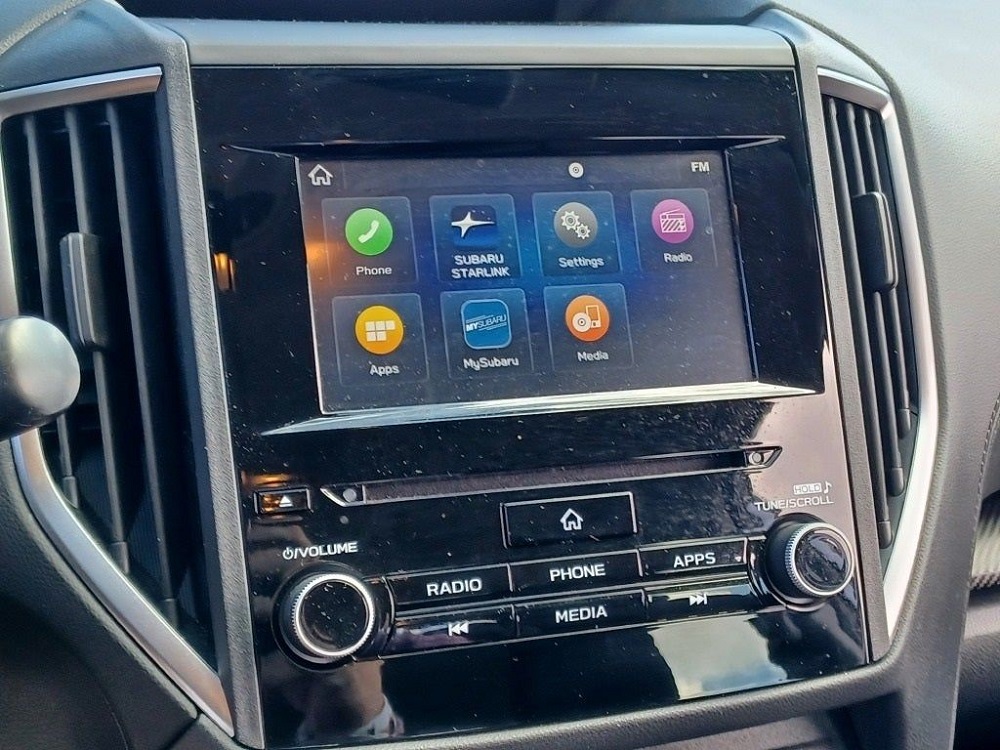
1. What Subaru Starlink / MySubaru Connected Services actually is
The badge changed, what runs it didn’t
Subaru swapped logos, not guts. The old STARLINK name now lives under the MySubaru app, but the core still runs through the same 4G LTE telematics box buried in the dash. That box sends crash alerts, listens for remote commands, and talks to Subaru’s servers without needing your phone to be nearby or even on.
In the cabin, the SOS key, the blue “i” button, and the head unit still control it all. New name, same backbone.
Two tech eras, two sets of features
From 2016 to 2025, the lineup runs on the familiar Safety Plus, Security Plus, and Concierge tiers. The safety stuff is baked into the car. The comfort features ride through the app.
For 2026 and newer, Subaru shifts to new Companion and Companion+ plans. Pricing’s still vague, and the hardware’s getting reworked too. Companion covers SOS and roadside. Companion+ adds the extras like remote start and alerts. It’s a platform shift, new radios, new subs, new math.
What each layer actually does
Safety Plus covers the serious calls; Automatic Collision Notification, the SOS button, stolen vehicle support, and vehicle health flags. These keep working even if your phone’s dead.
Security Plus handles daily perks: remote start, climate, lock and unlock, horn, lights, car finder, and driving alerts. These need strong signal and a working telematics module.
Concierge is a live help add-on for destination input and travel help. Nice to have. Not essential.
2. Pricing, free trials, and what you actually pay over time
The known costs for 2016–2025 plans
Safety Plus runs $9.95/month or $99.95/year. Pay yearly and lock in the core crash-response tools at Subaru’s lowest rate. Stack on Security Plus and the total hits around $159.35 per year (when Safety is annual, Security is monthly). Add Concierge, and the full suite lands near $218.75/year.
Nothing bundles or discounts here; it’s all stacked pricing. Safety Plus sits as the cleanest base. Everything else just adds cost.
The generous trial, and why it matters early
Every new Subaru includes a 3-year trial of Safety Plus, worth about $300 in coverage. That’s enough to span most leases or early ownership and keeps ACN, SOS, and health tools active when the car sees its hardest use.
Some trims also get 6 months of Security Plus. That’s your only real window to see if remote start and lock tools work well in your area. If they’re flaky during the trial, paying won’t fix them.
The 2026 plan shift and the pricing blind spot
Subaru hasn’t posted firm numbers for Companion or Companion+. Right now, dealers control the pricing, and that opens a guessing game for buyers. New hardware almost always means pricier subscriptions. The split between safety and comfort tools hints that Companion+ may creep higher than today’s Security Plus.
Order a 2026, and you’re stepping into a plan system with no public totals. That unknown isn’t just a minor detail; it’s part of what you’re buying.
MySubaru Plans (2016–2025): Real Features by Tier
| Plan / Bundle | Effective Cost (After Trial) | What You Actually Get That Matters | Who It Really Suits |
|---|---|---|---|
| Safety Plus | $99.95 / year (annual billing) | ACN, SOS, roadside, health notifications, OTA updates | Anyone focused on crash protection and system health |
| Safety Plus + Security Plus (S+S) | ≈$159.35 / year | All Safety features + remote start, locks, vehicle locator, driver alerts | Harsh-climate drivers or parents with teen drivers |
| Full Suite (Safety + Security + Concierge) | ≈$218.75 / year | All of the above + live concierge for travel and navigation help | High-mileage travelers using live-agent features |
3. Where Subaru Starlink actually proves its worth on safety
ACN and SOS step in before you can
A serious crash fires the telematics box before anyone inside can even react. It pulls crash data, locks GPS, and pushes everything to a live responder who can send EMS without waiting for a phone call. It runs on its own 4G line, not your phone; so it works even if your device’s dead or buried.
The SOS key covers what airbags don’t. Medical emergencies, sketchy breakdowns, or roadside danger all go straight to human support, with exact coordinates. When things turn serious, this part earns its keep.
Roadside and health alerts that don’t leave you guessing
Call for roadside through Starlink and the dispatcher gets VIN, location, and system data all in one packet. They show up knowing what they’re dealing with, not guessing from a noisy call on the shoulder.
Health alerts catch trouble early. They won’t replace your dash lights, but they flag things before the car leaves you stuck. That early warning is where Safety Plus keeps showing value, especially on higher-mile cars.
Who actually gains from keeping Safety Plus after the trial
If you’re driving late, rural, or in bad weather, Safety Plus earns its place. Commuters with long miles, parents of teen drivers, and folks in snow-heavy states get peace of mind phones can’t always guarantee.
If you’re in the city with short hops and fast access to help, the value fades. In those cases, factory safety and a basic roadside plan often cover the same ground.
4. The remote-start and app perks Subaru is really charging for
What Security Plus adds to your daily routine
Security Plus turns the car into a remote appliance. You get remote start, cabin climate, locks, lights, vehicle locator, and driving alerts. In weather-prone states, it means stepping into comfort instead of scraping ice or sweating at a red light.
You can share access across phones, and some smartwatches trigger commands too. When everything clicks, it works clean, fast, and feels far beyond a standard fob.
When signal and Subaru rules ruin the whole experience
Remote start dies fast when the car loses signal. Garages, metal structures, and hills drop the 4G link under 26% and block the command. Subaru’s rules add more hurdles: low fuel, recent refueling, or a key cycle issue can all stop a start request cold.
The app is hit or miss. Some owners see near-instant replies. Others wait through spinning wheels and missed starts. If the lag becomes normal, the whole paid tier starts to feel like a tech tax.
How Subaru compares when other brands offer remote tools for free
Hyundai now hands out core BlueLink+ features for free on many 2024+ models. Honda and Toyota price closer to Subaru but don’t offer three-year trials. Subaru bets on its longer safety window and standalone hardware to justify the Security Plus fee.
For drivers in strong-signal areas who use remote start daily, it can still be worth it. In signal-dead spots or for drivers burned by app lag, that value drops off fast.
Subaru vs. Competitors – Who’s Winning the Safety and Remote War?
| Brand / Service | Core Safety Coverage | Typical Cost After Trial | Free Trial Length | Quick Take on Value |
|---|---|---|---|---|
| Subaru Safety Plus | ACN, SOS, roadside, health reports | $99.95 / year | 3 years on new cars | Strong safety suite, longest free trial |
| HondaLink (Security/Safety) | ACN, emergency calling, roadside | ≈$89 / year | ~12 months | Cheaper, but much shorter trial |
| Hyundai BlueLink+ (2024+) | ACN, SOS, remote start, locks, alerts | $0 subscription | Effectively ongoing | Biggest threat, similar tools with no ongoing cost |
5. Hidden hardware faults that quietly wreck Starlink
When Harman Gen 3 screens broke the car’s digital spine
The 2017–2018 Harman Gen 3 units were a mess; frozen screens, ghost touches, dead cameras, bubbling glass. Subaru got hit hard enough to land in a class-action settlement covering around 785,000 vehicles with extended repair support.
But this wasn’t just a busted radio. These screens housed Starlink controls, navigation, and key interface layers. When they glitched, the entire digital cockpit went dark. What you lost wasn’t just sound; it was command over the car’s connected side.
What’s still alive when the screen isn’t
The good news: safety stays online. The telematics board runs independently, with its own power and antenna path. So if you crash, ACN still calls. Press the SOS button, and you’ll still reach a live agent.
But the rest? Gone. Starlink menus, health reports, camera views, and remote command feedback vanish. With the screen dead, using anything beyond safety tools becomes guesswork.
Why a dead head unit ruins more than the radio
Once the extended warranty runs out, head-unit failure becomes a four-digit problem. Between parts, labor, and reprogramming, infotainment repairs often cross the $1,000 mark. Many used-car owners skip the fix and drive with a busted screen.
But here’s the issue: without a working interface, those paid Starlink tiers lose their punch. Remote start, concierge, alerts, they all lean on that display. If you can’t trust the screen, the subscription isn’t worth it.
6. The data trail Subaru Starlink leaves behind
What’s tracked when Starlink is turned on
Once Connected Services go live, the car starts logging more than just service codes and crash flags. Subaru pulls account info, contact details, VIN, mileage, diagnostic trouble codes, location history, and driving behavior. Standard stuff in most telematics setups.
But it goes further. Subaru’s own privacy docs confirm that precise GPS tracking and cabin audio are part of the mix. That means not just where you drive, but what’s said while driving, can land on remote servers.
What “opting out” actually stops, and what it doesn’t
By default, Subaru treats your data as fair game for sharing or selling, unless you tell them not to. Fortunately, the company extends opt-out rights to all U.S. owners, not just Californians under CPRA.
Toggling this setting limits third-party marketing and profiling, but doesn’t cut Subaru off entirely. The company still collects data for warranty, diagnostics, legal compliance, and safety. Pulling out of the money-making side doesn’t stop the car from reporting in.
The only hard stop, and what you lose with it
Subaru makes it clear: the only way to fully stop vehicle data from flowing back is to cancel Connected Services entirely. There’s no halfway switch. No setting that keeps ACN and health alerts active while silencing the data trail.
Cancel the service, and you also lose the lifeline. SOS, crash alerts, remote functions, and health reporting all shut off. What you’re left with is a plain car, no network, no tracking, no help button. It’s a clean trade: keep the safety net and live with the data, or go dark and give it all up.
7. Starlink reliability depends on upkeep no one talks about
The hidden maintenance Starlink quietly demands
ACN and SOS sound like passive safety nets, but they rely on clean software, synced sensors, and a healthy telematics board. Subaru techs bring this up often: if updates fail or calibrations drift, those systems can silently fail.
Routine service visits usually scan the system behind the scenes; skip them, and the odds of failure rise right when you need it most.
Letting the subscription lapse doesn’t just remove features; it can block modules from pulling updates, leaving functions to decay even when the hardware’s fine.
Terrain and signal shape how useful Starlink really is
Rural dead zones, canyon drives, and edge-of-tower zones choke off both safety and comfort tools. The telematics box needs stable 4G to send commands or receive them. Crash detection can sometimes punch through weak spots, but remote starts and lock commands usually stall first.
City and dense suburb zones flip the story. Reliable signal means faster commands and stronger system uptime. That’s why the free trial should be tested where you actually drive, not just from the driveway.
Older cars demand more effort and offer less payoff
Brand-new cars get the best run; fresh screens, solid hardware, and that full 3-year Safety Plus trial. Everything runs crisp during the warranty window.
Used buyers face a steeper hill: aging head units, short or missing trials, and infotainment already showing wear. By year 7 or 8, the value starts tilting. Subscription tools ask more money while delivering less certainty, especially once coverage ends and repairs fall on the owner.
8. Who actually wins with Subaru Starlink, and who should skip it
Safety-focused drivers in tough conditions
Starlink makes the most sense for those who live far from help. Rural commuters, highway runners, mountain travelers, and parents with new drivers all get real return from ACN and SOS.
These tools buy time when cell coverage drops and seconds matter. For this group, keeping Safety Plus isn’t a splurge; it’s backup that phones alone can’t replace.
Daily drivers who rely on remote comfort
In high-heat or deep-freeze zones, remote start isn’t a toy; it’s daily survival. If your car parks outside, the signal stays strong, and the app works fast, then Security Plus folds neatly into your routine. Cabin pre-conditioning, quick lock checks, and GPS pings all help in multi-driver families or tight schedules.
Drivers who’ll never see the value, or won’t accept the trade
Cost-conscious buyers notice fast: Subaru’s charging for features Hyundai now includes free. Paying $100+ yearly for something that other brands bake in turns a lot of owners away once the trial ends.
Privacy-first drivers back out even sooner. GPS logs, cabin audio capture, and Subaru’s data-sharing stance make the paid tiers a tough sell. And you can’t have it both ways; canceling Connected Services is the only way to stop the data feed, but doing so removes every feature it powers.
How different owners should treat Subaru Starlink
| Owner Type / Priority Profile | Recommended Move | When It Makes Sense | When It Really Doesn’t |
|---|---|---|---|
| Safety-first, highway / rural driver | Keep Safety Plus after free trial | You drive out of town a lot and want ACN/SOS live and ready | You never leave metro areas and already have backup (OnStar, phone apps, etc.) |
| Cold / very hot climate, loves remote start | Run Safety + Security Plus during trial | The app is fast, signal is solid, remote start saves you daily | LTE is spotty or the app is so slow you beat it to the car |
| Road warrior, likes concierge hand-holding | Only consider full suite if used often | You often book hotels or plan routes with help from the car | You already use travel apps and don’t need live agents |
| Budget-tight owner, normal commuting | Use the 3-year free trial, then cancel | Free safety coverage in early ownership | Paying $100+ per year duplicates tools your phone already does |
| Privacy-sensitive driver | Skip paid tiers or cancel early | You’re not okay with audio/location data being logged and shared | You expect privacy and remote features, they don’t coexist in this setup |
Where Starlink really stands after the miles add up
The safety layer holds its ground. ACN and SOS stay online even when your phone’s dead or the screen blanks out. That kind of reliability matters; on rural roads, winter highways, late-night runs, and for families who want backup built into the car. For high-risk, high-mile drivers, Safety Plus earns its keep.
The comfort tier’s a different story. In good signal zones with healthy hardware, remote start and lock control feel modern and seamless. But the moment LTE fades or the head unit starts aging, those same tools stumble. When they miss more than they hit, they stop justifying the bill.
Then there’s the data trail. Starlink logs where you go, how you drive, and what’s said in the cabin. Pulling the plug on that pipeline means shutting the whole system down. There’s no halfway switch; you either keep the service and live with the tracking, or cut it all off.
Starlink delivers when safety matters and signal stays strong. Outside that lane, most drivers can walk away after the trial and lose nothing that really changes the drive.
Sources & References
- Is It Worth Paying for Subaru STARLINK? A Comprehensive Guide for Sunset Hills, MO Drivers
- SUBARU STARLINK Guide: Cost, Subscription & Features
- Subaru Connected Services
- SERVICE INFORMATION BULLETIN – nhtsa
- My story of two Starlink systems in 5 years- Starlink screens are defective and Subaru needs to fix it – Reddit
- $6.25M Settlement Reached in Subaru Starlink Lawsuit – The National Trial Lawyers
- Subaru Starlink Class Action Settlement
- Subaru | Privacy & security guide – Mozilla Foundation
- Vehicle Privacy Notice – Subaru
- MySubaru app
- MySubaru Connected Services | Subaru
- Connected Services – Sutherlin Subaru
- SUBARU STARLINK™
- How To Use HondaLink App | Plans, Costs, Features, FAQs – Proctor Honda
- MySubaru Safety and Security Plans | Subaru
- MySubaru Companion and Companion+ Plans | Subaru
- MySubaru – Apps on Google Play
- Is the my Subaru app worth it? : r/Subaru_Outback – Reddit
- How Subaru’s Starlink Safety Features Depend on Proper Service and Updates
- What is Hyundai BlueLink? | Features & Benefits
- Privacy Policy – Starlink
- Consumer Privacy Rights – Subaru
Was This Article Helpful?